Once you start writing more often, unfinished posts start piling up in the repo. I wanted to keep those drafts around without risking that they would accidentally show up in the public blog, so I added a simple draft system around my filesystem-based blog.
I already had GitHub OAuth in place for a private admin area, plus a server-side admin check based on role and email. That made the draft flow fairly small to implement.
Requirements
This setup assumes you already have:
- markdown or MDX posts with frontmatter
- some form of authentication
- a way to distinguish a specific user from a regular visitor, for example by role, email address, or username
I use GitHub OAuth through better-auth. Admin access is then determined server-side based on role or a configured email match.
What The System Should Do
- Mark a post as a draft via frontmatter.
- Hide drafts from the public blog listing.
- Allow me (the admin) to preview them while logged in.
- Prevent direct access to draft URLs by unauthorized users.
That breaks down into four small pieces:
- parse a
draftfield from frontmatter - keep separate public and internal post queries
- check whether the current user is allowed to see drafts
- return
404when a draft is requested by anyone else
Step 1: Parse draft From Frontmatter
The first thing I needed was a way to mark a post as private at the content level. Since the blog already runs on Markdown files with frontmatter, the most direct option was adding a draft field there.
That meant teaching the frontmatter parser to recognize and store that value.
switch (trimmedKey) { case 'title': metadata.title = value break case 'summary': metadata.summary = value break case 'draft': metadata.draft = value.toLowerCase() === 'true' break case 'slug': metadata.slug = value break case 'updatedAt': metadata.updatedAt = value break}With that in place, a post can be marked directly in the file:
---title: "Some unfinished post"draft: true---Not required, but I put all my draft MDX files in a drafts directory inside the root of my blog folder, following the Next.js file-based routing approach.
- set
draft: truein frontmatter - move the file into a drafts folder
Step 2: Split Public And Internal Post Queries
Once the metadata existed, I split the read path into two functions:
File: src/lib/blog/posts.ts
getBlogPosts()for public pagesgetAllBlogPosts()for admin-aware pages
The public version filters out drafts, while the internal version keeps everything.
This separation matters because it keeps the rest of the app simple. Pages that should never expose drafts do not need to remember how to filter them manually every time.
Step 3: Check Whether The User Is Admin
I use a small server-side helper for this. In my case, a user counts as admin if they either:
File: src/utils/is-admin.ts
- have the
adminrole - match one of the configured admin email addresses
The helper looks roughly like this:
export async function isAdmin() { const session = await getServerSession() if (!session?.user) return false const isEmailMatch = isAdminEmail(session.user.email) const isRoleAdmin = session.user.role === 'admin' return isRoleAdmin || isEmailMatch}One small but important distinction: my proxy.ts only protects the /admin area itself. Draft protection for blog posts happens inside the blog route, not in middleware.
Related file: src/proxy.ts
Step 4: Protect The Blog Route
In the dynamic blog route, I fetch the post and then check whether the current user is allowed to see it. If the post is a draft and the user is not admin, they get a 404.
The important part is that the route uses the admin-aware post source first, then performs authorization explicitly.
File: src/app/(marketing)/blog/[...slug]/page.tsx
const isAdminUser = await checkAdminStatus()const allPosts = getAllBlogPosts()const post = allPosts.find(p => p.slug === slug) if (!post) { notFound()} if (post.metadata.draft && !isAdminUser) { notFound()}This keeps the behavior predictable:
- admins can preview draft URLs directly
- non-admin users cannot tell whether a draft exists
- public blog pages still use the filtered post list
Result
The final system is small, but it covers the whole flow:
- drafts stay in the repository
- the public listing stays clean
- admins can preview unfinished work in production-like conditions
- direct links to draft posts stay private
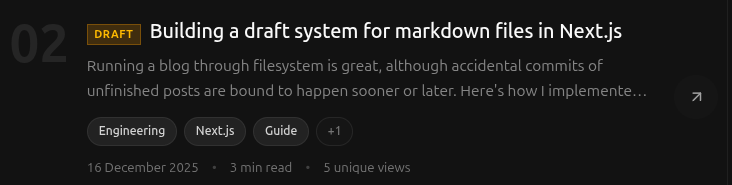
I also added a visible draft badge in the blog listing so I can immediately tell which entries are still private when browsing as admin.
Related file: src/components/blog/posts-client.tsx